top of page


Design Process
Game Design Document:
https://docs.google.com/document/d/1pj7Qle8_3wEEJuEi3aEcGxN3Ebihh21cTE9m2M_pA6E/edit?tab=t.0#heading=h.x96l4g6f9djs
This is our Final Year Project, where we can make any kind of games that we would like to work on for 8 months. As a rhythm games lover, I decided that I wanted to make a rhythm game.
First, I planned out the main gameplay idea of the rhythm game with:
- Types of Notes
- Songs
- How to clear the song
- Scoring Systems
- Characters
Types of Notes
For PC rhythm games, there are 2 common types of notes:
- Tap Notes
- Hold Notes
However, I wanted to make something more unique for a PC rhythm game. So I added Catch Notes, which are notes that look similar to tap notes but are in a different colour and thinner, and it can also change into another lane halfway through holding it.
Aside from that, I also want to make the players feel good, similar to how when they tap a special note with satisfying sound effects, it can also give a score boost. Something like maimai DX's Climax Notes (the orange one). So I added Critical Note, which is a note that covers all the lanes, and players can press the Spacebar to hit it, and it will give an impactful sound effect with a score boost.
Songs
As of right now, there are a total of 4 songs planned for the game where 2 are licensed songs and 2 are original songs.
It was pretty simple to get the songs because I have a label that I ran called Maritime Collective, and I was able to use one of the songs in there for my game. Of course, it is also important to ask the song's artist for usage of permission. As for the songs that are not based on my label, I would have to ask the artist for permission to use the song. Since the song was already made, it was easy to talk to the artist about it since we have the connection, and I told him that this will be used for our Final Year Project.
For Original Songs, I made one under my music alias "Altermis" and I also asked one of my friends to help out working on the songs too.
Clearing the Songs
To make sure that the players clear the songs, I decided to add a gauge bar. Mostly taking inspirations from games like Arcaea and Sound Voltex, where the more notes you hit the higher you fill in your gauge but if you miss the notes the gauge that you fill will drop as well.
The players will clear the song if they filled 70% of the gauge and maintain it until the song ends.
Scoring System
When players finish their song, they will receive their total scores depending on how many notes they hit as well as how accurate their timing is when they hit the notes. This will total up the scores and show them to the players. As well as a grade showing them whether they got an 'A' or a 'B'. Making them wanting to try again so they can achieve much higher score than the current one they have.
Characters
To me, I think that adding in characters into a rhythm game is very interesting as they can be a mascot (or waifus) for the game. The character can act as a navigator, guiding the players and is able to interact with them.
However, I also want the characters to have a sense of gameplay in this game. Similar to many arcade rhythm games such as Ongeki. So I decided to make three characters, and each character will have different skills that can either support the players or give the players challenges.
Charting
Our team was able to obtain a plugin called Koreographer for Unity. Which is a plugin where it can sync gameplay elements with music. Which is a must have for rhythm games. And since it is a rhythm game, charting (or level designing) is very important.
So, since Koreographer requires MIDI files to work, I decided to chart the levels using Ableton. Which is a music production software but it can also generate MIDIs and export MIDI files in the end.
Here is an image of it:
After that, I will separate each of the notes in different lanes and export all of them and import it into Koreographer.
Making a rhythm game can be difficult as you want to make sure that the charts or the levels that you design are balanced and enjoyable. It is also important to get feedback on the chartings so that you can fix certain things in the game.
UI Mockups
Here are some of my UI Mockups that I'd made:


Main Menu

Gameplay

Result Screen

Result Screen (detailed)
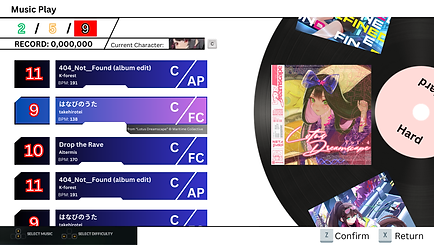
Song Selection
BGM
Aside from the game design, I also worked on the BGM of the game. Here is some of my work.
Main Menu
Result Screen
Gameplay Screenshots


bottom of page